Binding BTP Service Instances to your CAP Application with Kyma Runtime
In this post, we will guide you through the process of binding BTP service instances to your CAP (Cloud Application Programming) application on the Kyma runtime. We will cover the steps to create service bindings and how to use them in your application.
Series — SAP BTP Kyma Runtime:
- Preparing Your Environment For SAP BTP Development on Kyma Runtime
- Deploying Your First CAP Application on SAP BTP Kyma Runtime
- Creating BTP Service Instances on SAP BTP Kyma Runtime with the Service Operator
- Binding BTP Service Instances to your CAP Application with Kyma Runtime (this post)
- The Chart Templates Behind Your CAP Kyma Deployment
- Creating roles for your CAP Application on SAP BTP Kyma Runtime
- Using Istio Gateway as Entry Point in SAP BTP Kyma Runtime
Create the CAP application
In this case we will create a CAP application that consumes a HANA Cloud service instance, an XSUAA service instance, and the Destination service instance.
This is a continuation of the previous post Deploying Your First CAP Application on SAP BTP Kyma Runtime, where we created a simple CAP application and deployed it to the Kyma runtime.
Let's start creating the new CAP app with the following command:
cds init my-cap-app
cd my-cap-app
cds add nodejs
npm install
cds add tiny-sample
cds add hana xsuaa destination
cds add kyma
The differences with the previous CAP application
Now that we have binded some BTP services, our containerize.yaml has changed a bit, and now looks like this:
# containerize.yaml
_schema-version: '1.0'
repository: cpit-cp-a2c-csid-support.common.repositories.cloud.sap
tag: latest
modules:
  - name: my-cap-app-srv
    build-parameters:
      buildpack:
        type: nodejs
        builder: builder-jammy-base
        path: gen/srv
        env:
          BP_NODE_RUN_SCRIPTS: ""
  - name: my-cap-app-hana-deployer
    build-parameters:
      buildpack:
        type: nodejs
        builder: builder-jammy-base
        path: gen/db
        env:
          BP_NODE_RUN_SCRIPTS: ""
It includes a new module called my-cap-app-hana-deployer, which is a one-off job that will deploy the HANA database artifacts. This is necessary because we have bound a HANA service instance to our application.
The Chart.yaml has also changed, and now looks like this:
# /chart/Chart.yaml
apiVersion: v2
name: my-cap-app
description: A simple CAP project.
type: application
version: 1.0.0
appVersion: 1.0.0
annotations:
  app.kubernetes.io/managed-by: cds-dk/helm
dependencies:
  - name: web-application
    alias: srv
    version: ">0.0.0"
  - name: service-instance
    alias: hana
    version: ">0.0.0"
  - name: content-deployment
    alias: hana-deployer
    version: ">0.0.0"
  - name: service-instance
    alias: xsuaa
    version: ">0.0.0"
  - name: service-instance
    alias: destination
    version: ">0.0.0"
The application now has dependencies on the service-instance chart for HANA, XSUAA, and Destination services, as well as a dependency on the content-deployment chart for the HANA deployer job.
The details for each dependency are defined in the values.yaml file, which looks like:
# /chart/values.yaml
global:
  domain: <your-kyma-subdomain>.kyma.ondemand.com
  imagePullSecret:
    name: docker-registry
  image:
    registry: <your-container-registry-url>
    tag: latest
srv: # The "web-application" — Your CAP Application
  bindings:
    auth:
      serviceInstanceName: xsuaa
    db:
      serviceInstanceName: hana
    destination:
      serviceInstanceName: destination
  image:
    repository: my-cap-app-srv
  resources:
    limits:
      ephemeral-storage: 1G
      memory: 500M
    requests:
      ephemeral-storage: 1G
      cpu: 500m
      memory: 500M
  health:
    liveness:
      path: /health
    readiness:
      path: /health
xsuaa: # The "service-instance" — XSUAA
  serviceOfferingName: xsuaa
  servicePlanName: application
  parameters:
    tenant-mode: dedicated
    oauth2-configuration:
      redirect-uris:
        - https://*.{{ tpl .Values.global.domain . }}/**
    xsappname: my-cap-app-{{ .Release.Namespace }}
hana-deployer: # The "content-deployment" — HANA Deployer Job
  image:
    repository: my-cap-app-hana-deployer
  bindings:
    hana:
      serviceInstanceName: hana
  resources:
    limits:
      cpu: 2000m
      memory: 1G
    requests:
      cpu: 1000m
      memory: 1G
hana: # The "service-instance" — HANA
  serviceOfferingName: hana
  servicePlanName: hdi-shared
destination: # The "service-instance" — Destination
  serviceOfferingName: destination
  servicePlanName: lite
  parameters:
    version: 1.0.0
Notice that each service instance has its own configuration block, and the srv block has a bindings section that specifies which service instances to bind to the application.
Deploy the application
Let's create a new namespace in our Kubernetes cluster in Kyma for our application:
kubectl create namespace my-namespace
kubectl label namespace my-namespace istio-injection=enabled
And now deploy the app:
cds up -2 k8s --namespace my-namespaceRemember that the first time you deploy into a namespace, the console will prompt to get the repository credentials for the container registry. You will need to provide the credentials for your container registry so the kubernetes cluster can pull the images for your application.
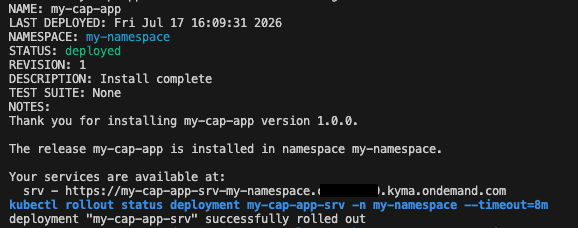
Once completed, you should see the following output:
Verify the deployment
Let's check what has been deployed in our namespace:
kubectl get all -n my-namespace
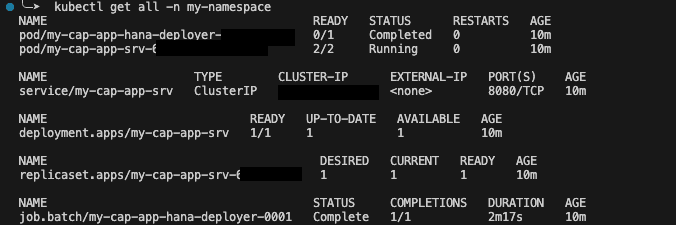
We have 2 Pods, one for the CAP application my-cap-app-srv (which is running) and one for the HANA deployer job my-cap-app-hana-deployer (with status completed). This is correct, since the HANA deployer job is a one-off job that runs to deploy the HANA database artifacts and then completes, while the CAP application is a long-running service that will continue to run.
Related with the Hana deployer Pod, we have a Job job.batch/my-cap-app-hana-deployer-0001 that has completed successfully. This is the job that runs the HANA deployer Pod to deploy the HANA database artifacts.
We have also a service service/my-cap-app-srv of type ClusterIP for the CAP application, which is used for internal communication within the cluster.
And finally the Deployment and ReplicaSet for the CAP application, which manage the lifecycle of the CAP application Pod.
Inspect the bindings in the CAP application
To get the details of the CAP Application Pod, we can run the following command:
kubectl describe pod my-cap-app-srv-<pod-id> -n my-namespaceIt returns a lot of information, but we can find a few interesting pieces regarding the service bindings.
In the Environment section, we can see:
SERVICE_BINDING_ROOT: /bindingsThis means that the service bindings are mounted in the /bindings directory inside the Pod.
And in the Volumes section, we can see the service bindings mounted as volumes and the secrets that contain the service binding information:
  bindings-root:
    Type:       EmptyDir (a temporary directory that shares a pod's lifetime)
    Medium:
    SizeLimit:  <unset>
  auth:
    Type:        Secret (a volume populated by a Secret)
    SecretName:  my-cap-app-srv-auth
    Optional:    false
  db:
    Type:        Secret (a volume populated by a Secret)
    SecretName:  my-cap-app-srv-db
    Optional:    false
  destination:
    Type:                     Secret (a volume populated by a Secret)
    SecretName:               my-cap-app-srv-destination
    Optional:                 false
The SecretName for each service binding is generated based on the application name and the binding name.
Remember that in the values.yaml file, we defined the bindings for the CAP application as follows:
srv: # The "web-application" — Your CAP Application
  bindings:
    auth:
      serviceInstanceName: xsuaa
    db:
      serviceInstanceName: hana
    destination:
      serviceInstanceName: destination
...
So now the service instances are named my-cap-app-srv-auth, my-cap-app-srv-db, and my-cap-app-srv-destination respectively.
We can list all the service instances in the namespace with the following command:
kubectl get serviceinstances -n my-namespace

And the service bindings with the following command:
kubectl get servicebindings -n my-namespace

Note that the HANA Deployer job has its own service binding for the HANA service instance, which is named my-cap-app-hana-deployer-hana. This is normal, since the HANA Deployer job needs to access the HANA service instance to deploy the database artifacts. Therefore the HANA Service has 2 bindings, one for the CAP application and one for the HANA Deployer job.
Running in localhost with hybrid mode
Now that we have deployed our CAP application to the Kyma runtime, and the service instances and service bindings are created, we can run the CAP application in localhost with hybrid mode, which allows us to run the application locally while still using the service instances and service bindings from the Kyma runtime.
To do so we have to bind the service instances to our local CAP application. But first, we need to set our namespace as the default namespace in the kubectl context. We can do this with the following command:
kubectl config set-context --current --namespace=my-namespaceNow we can bind the services:
cds bind --to my-cap-app-srv-destination --on k8s
cds bind --to my-cap-app-srv-auth --on k8s
cds bind --to my-cap-app-srv-db --on k8s
This generates a new file .cdsrc-private.json with the service bindings information, which will be used by the CAP application when running in localhost with hybrid mode. Check more about hybrid mode in the CAP documentation.
Now we can run the CAP application in localhost with hybrid mode:
cds watch --profile hybridRelated links
- Deploying Your First CAP Application on SAP BTP Kyma Runtime
- Creating BTP Service Instances on SAP BTP Kyma Runtime with the Service Operator
- The Chart Templates Behind Your CAP Kyma Deployment
- Kubernetes for Developers - Basic Concepts
- Development in the Kyma Environment
- Deploy a Full-Stack CAP Application in SAP BTP, Kyma Runtime Following SAP BTP Developer’s Guide