Kubernetes for Developers - Basic Concepts
Kubernetes plays a crucial role in modern software development, enabling developers to manage and orchestrate containerized applications efficiently. In this post we cover the foundations every developer should know: what Kubernetes is, how clusters, nodes and pods fit together, and the kubectl commands you'll use day to day.
What is Kubernetes (k8s)?
Kubernetes, often abbreviated as k8s, is an open-source platform designed to automate the deployment, scaling, and management of containerized applications. It provides a robust framework for running distributed systems resiliently, allowing developers to focus on building applications without worrying about the underlying infrastructure.
Kubernetes is like a conductor in an orchestra, coordinating various components to ensure they work together harmoniously. It abstracts away the complexities of managing containers, enabling developers to deploy applications seamlessly across different environments.
Series — Kubernetes for Developers:
Key Features of Kubernetes
- Service discovery and load balancing: Kubernetes can automatically expose a container using the DNS name or their own IP address. If traffic to a container is high, Kubernetes can load balance and distribute the network traffic so that the deployment is stable.
- Storage orchestration: Kubernetes allows you to automatically mount a storage system (like docker volumes) of your choice, such as local storage, public cloud providers, and more.
- Deployment orchestration (rollouts / rollbacks): Kubernetes can manage the deployment of new versions of your application, ensuring that updates are rolled out gradually and can be rolled back if something goes wrong, with zero downtime.
- Self-healing: Kubernetes can automatically restart containers that fail, replace containers, kill containers that don't respond to your user-defined health check, and doesn't advertise them to clients until they are ready to serve.
- Secret and configuration management: Kubernetes allows you to store and manage sensitive information, such as passwords, OAuth tokens, and SSH keys. You can deploy and update secrets and application configuration without rebuilding your container images, and without exposing secrets in your stack configuration.
- Horizontal scaling: Kubernetes can scale your application up and down automatically based on CPU usage or other metrics, ensuring that your application can handle varying levels of traffic efficiently.
Main Components of Kubernetes
Kubernetes consists of several key components that work together to manage containerized applications. Some of them are:
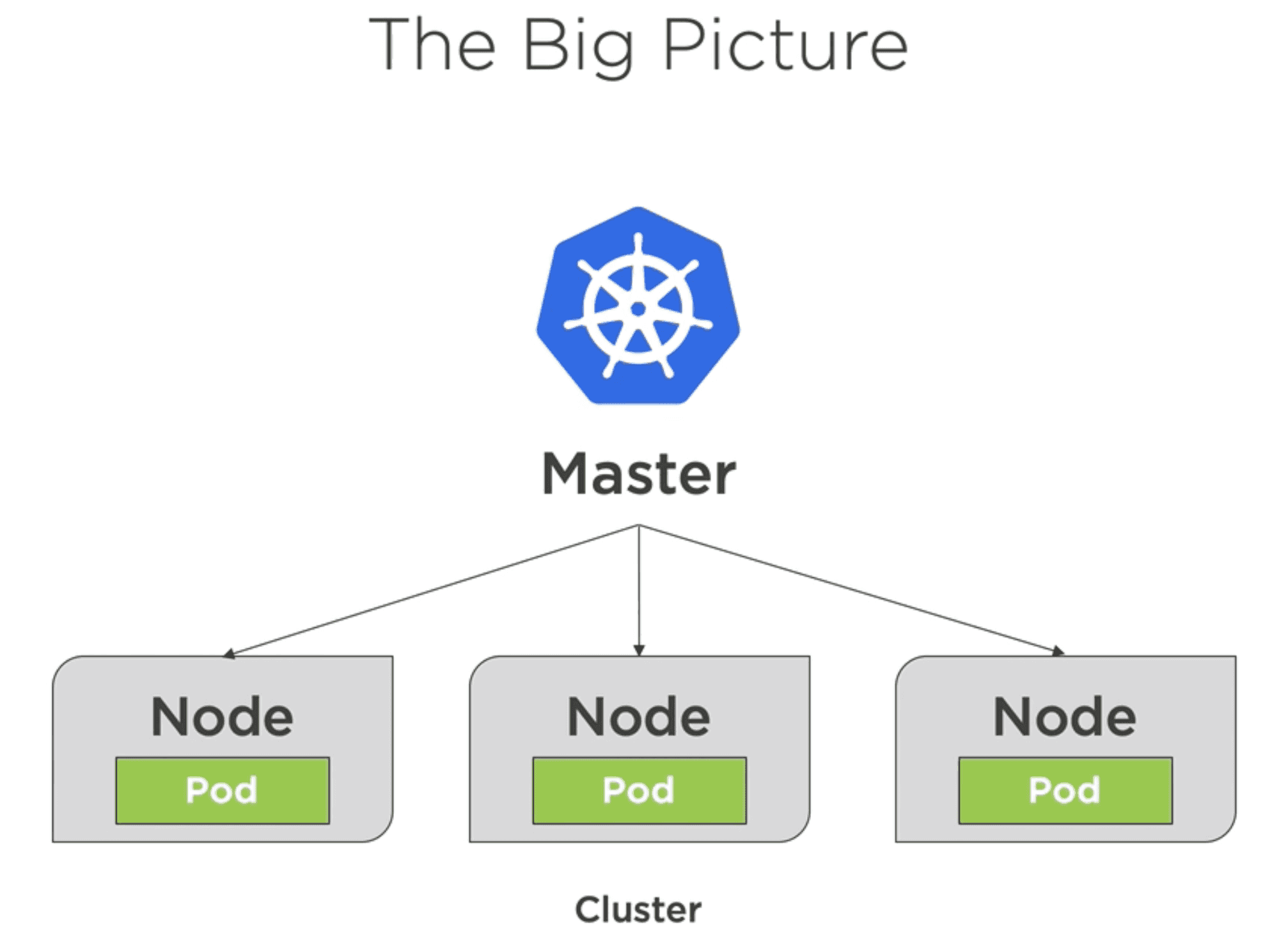
- Cluster: A Kubernetes cluster is a set of nodes (machines) that run containerized applications. It consists of a master node and worker nodes, where the master node manages the cluster and the worker nodes run the applications.
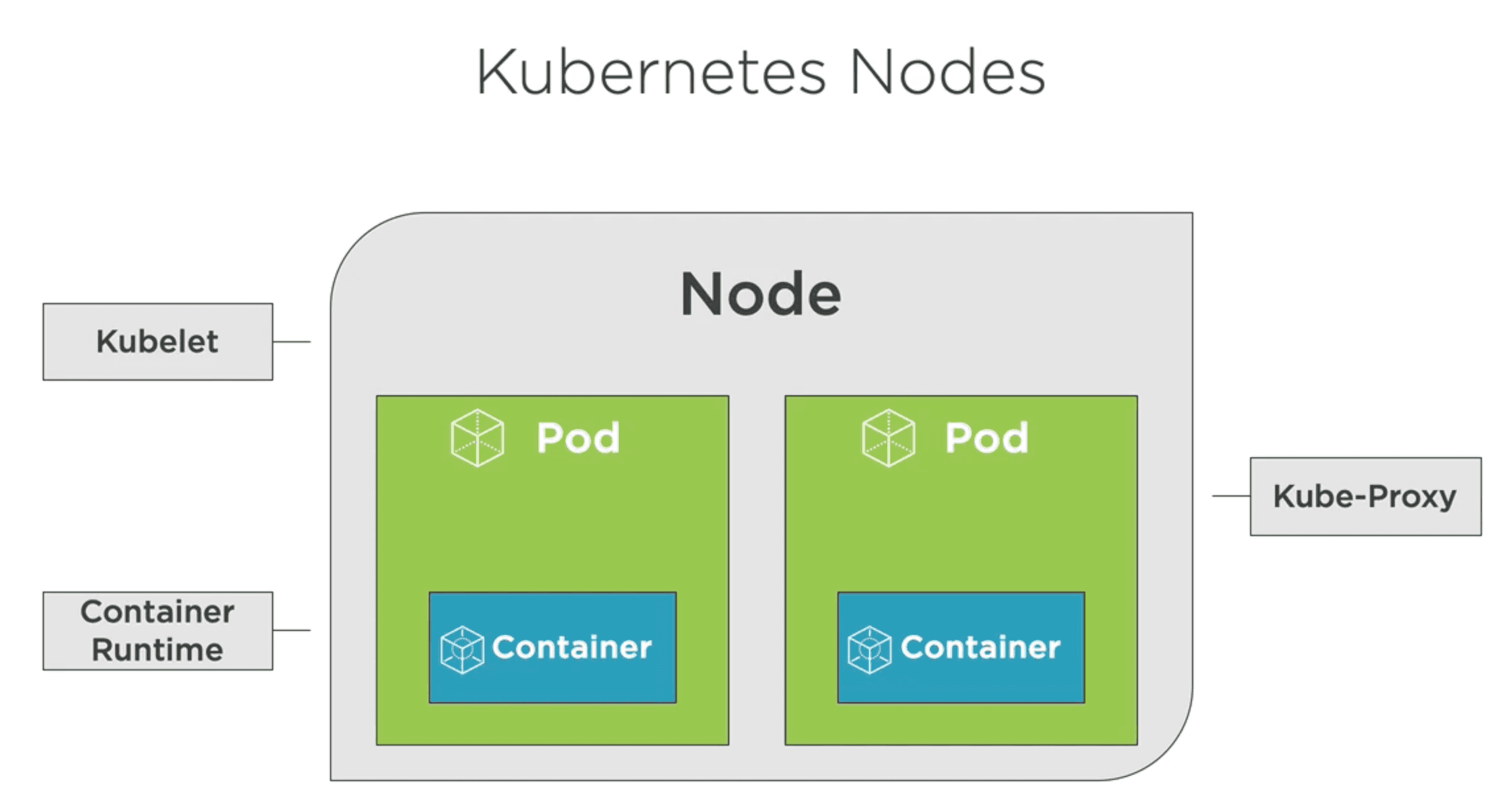
- Node: A node is a single machine (virtual or physical) in the Kubernetes cluster. Each node runs a container runtime (like Docker), the kubelet (which communicates with the master), and other necessary components to run containers.
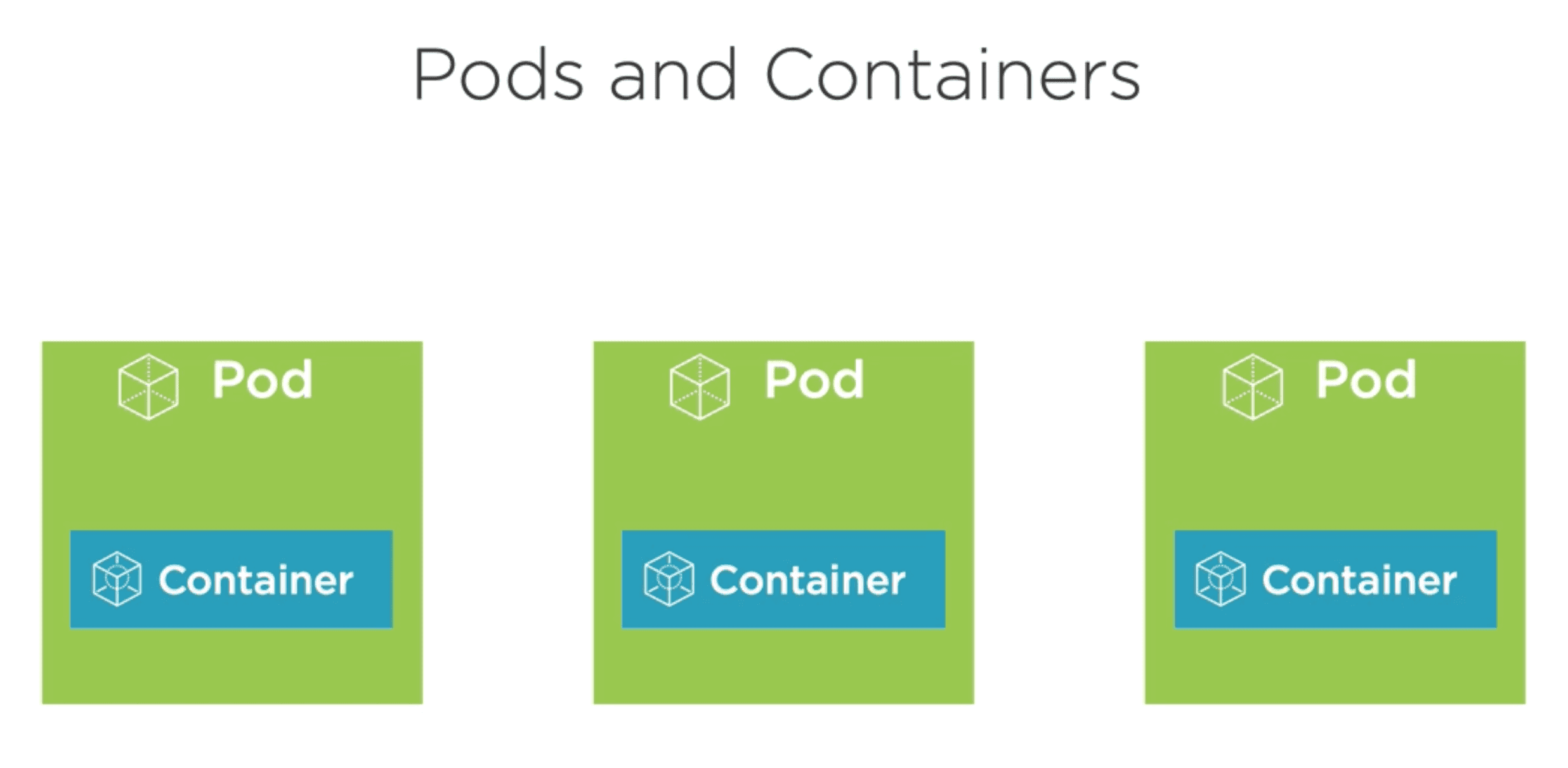
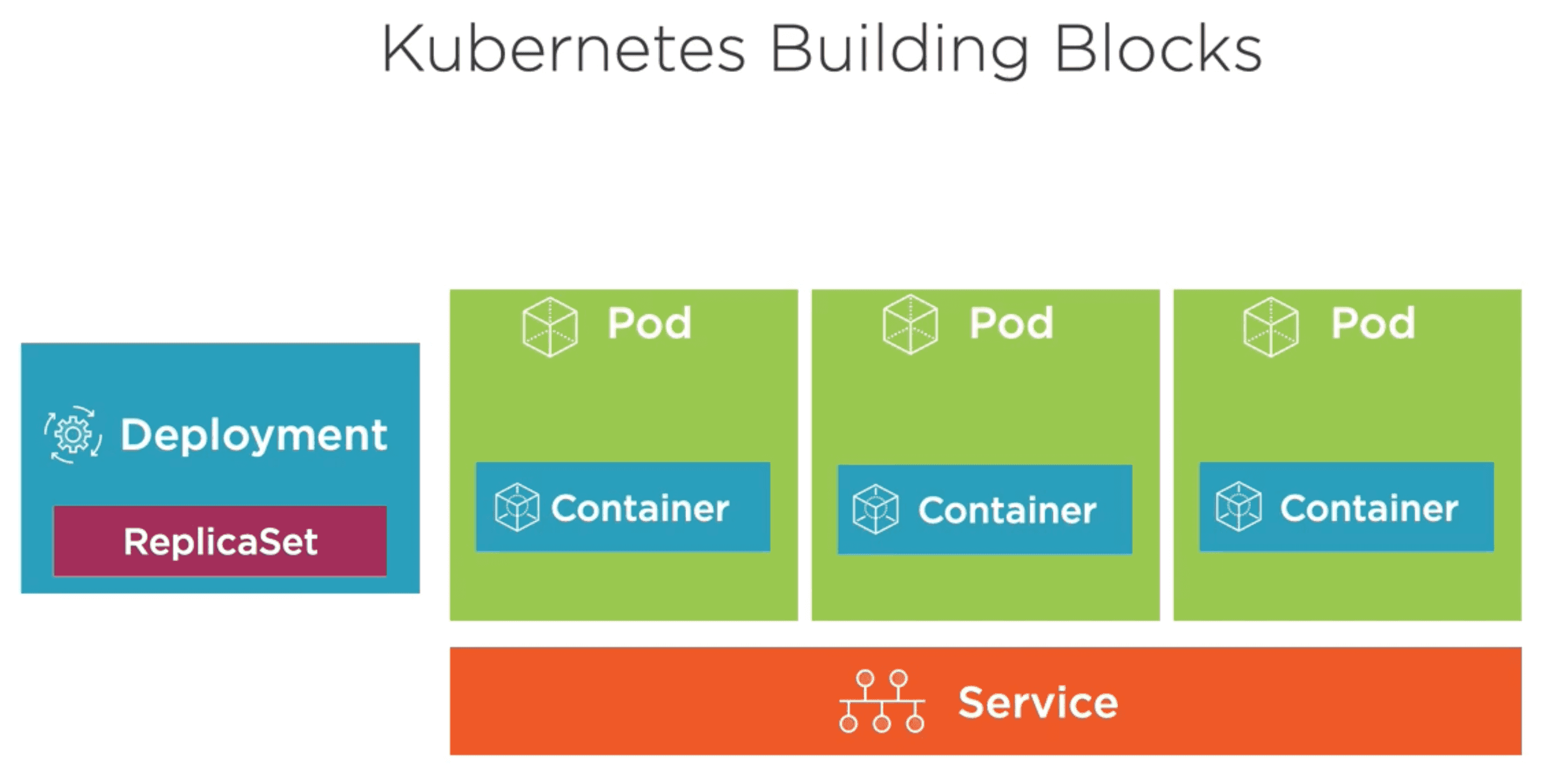
- Pod: A pod is the smallest deployable unit in Kubernetes, representing a single instance of a running process in a cluster. A pod can contain one or more containers that share the same network namespace and storage volumes. Pods are ephemeral and can be created, destroyed, and recreated as needed. As an analogy, think of a pod as a "wrapper" around one or more containers, providing them with a shared environment to run in.
- Deployment and Replica Sets: A deployment is a higher-level abstraction that manages the lifecycle of pods and ensures that the desired number of replicas are running at any given time. It allows you to define the desired state of your application, and Kubernetes will automatically manage the creation, scaling, and updating of pods to match that state. Replica sets are used by deployments to maintain a stable set of replica pods running at any given time.
- Service: A service is an abstraction that defines a logical set of pods and a policy to access them. Services enable communication between pods or the outside world. Services can be exposed internally within the cluster or externally to the internet.
The Master Node and Worker Nodes
The master node is the control plane of the Kubernetes cluster, responsible for managing the cluster's state and making decisions about scheduling, scaling, and maintaining the desired state of applications. It runs several key components, including the API server, scheduler, controller manager, and etcd (a distributed key-value store for cluster data).
The worker nodes are the machines that run the actual applications in the form of pods. Each worker node runs a container runtime (like Docker), the kubelet (which communicates with the master), and other necessary components to manage and run containers.
The master node coordinates the worker nodes, ensuring that the desired state of the applications is maintained and that resources are allocated efficiently across the cluster.
For us to communicate with the master node and manage the cluster, we use the kubectl command-line tool. This tool allows developers to interact with the Kubernetes API server, enabling them to deploy applications, inspect and manage cluster resources, and view logs.
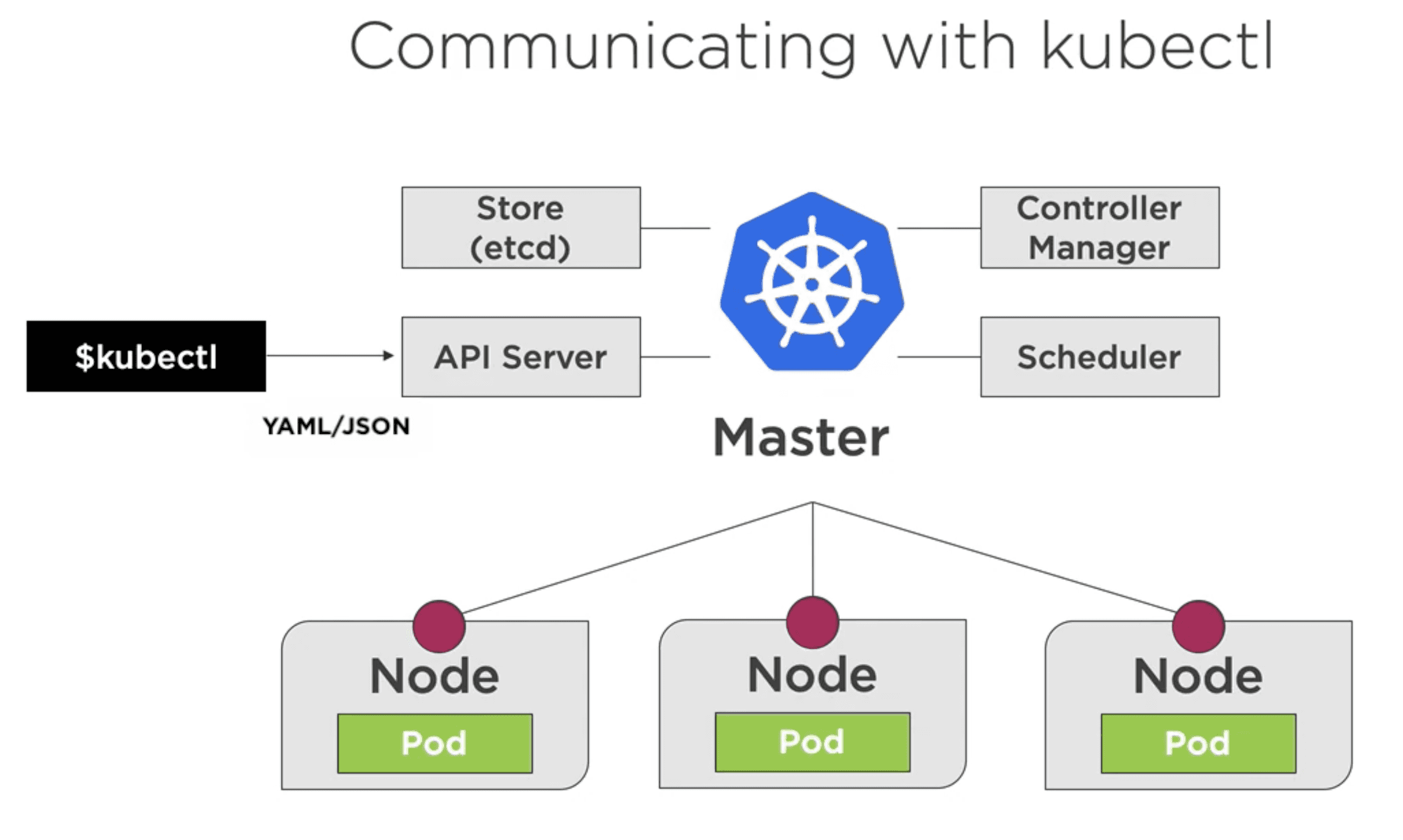
So after sending a command to the master node via the kubectl tool, the master node will schedule and communicate with the worker nodes to ensure that the desired state of the application is achieved. The worker nodes have a mini-agent called the kubelet, which is responsible for managing the pods and containers running on that node. The kubelet communicates with the master node to receive instructions and report the status of the pods and containers. Beside it, the worker nodes also have a container runtime (like Docker) that is responsible for running the containers within the pods, and a kube-proxy that manages network communication between pods and services.
Benefits of Using Kubernetes for Developers
- Orchestrate containers: Kubernetes simplifies the management of containerized applications, allowing developers to focus on writing code rather than managing infrastructure.
- Zero downtime deployments: Kubernetes enables rolling updates and rollbacks, ensuring that applications can be updated without downtime.
- Self-healing: Kubernetes automatically restarts failed containers and replaces them, ensuring that applications remain available and resilient.
- Scalability: Kubernetes allows developers to scale applications up or down based on demand, ensuring optimal resource utilization and performance.
- Portability: Kubernetes abstracts away the underlying infrastructure, allowing developers to deploy applications consistently across different environments, whether on-premises or in the cloud.
Getting Started with Kubernetes
To get started with Kubernetes, developers can set up a local development environment using tools like Minikube, Kind (Kubernetes in Docker) or Docker Desktop. These tools allow developers to run a single-node Kubernetes cluster on their local machine, making it easier to experiment with Kubernetes features and develop applications without needing a full-scale cluster.
At minimum, we have to install the kubectl command-line tool to interact with the Kubernetes cluster. Once installed, developers can use kubectl to deploy applications, manage resources, and monitor the state of the cluster.
See more about the tools in the Kubernetes documentation.
Useful commands for developers
kubectl version: Check the version of kubectl and the Kubernetes cluster.kubectl cluster-info: Display information about the Kubernetes cluster.kubectl get all: List all resources in the cluster.kubectl get nodes: List all nodes in the cluster.kubectl get pods: List all pods in the cluster.--image=<image-name: Run a new pod in the cluster.<local-port: Forward a local port to a port on a pod.--type=<service-type: Expose a pod as a service with a load balancer.kubectl create -f <file.yaml>: Create resources defined in a YAML file.kubectl apply -f <file.yaml>: Apply changes to resources defined in a YAML file.kubectl delete -f <file.yaml>: Delete resources defined in a YAML file.kubectl logs <pod-name>: View the logs of a specific pod.<resource-name: Get detailed information about a specific resource.-it sh: Execute a command in a running pod (e.g., open a shell).
Dashboard for Kubernetes
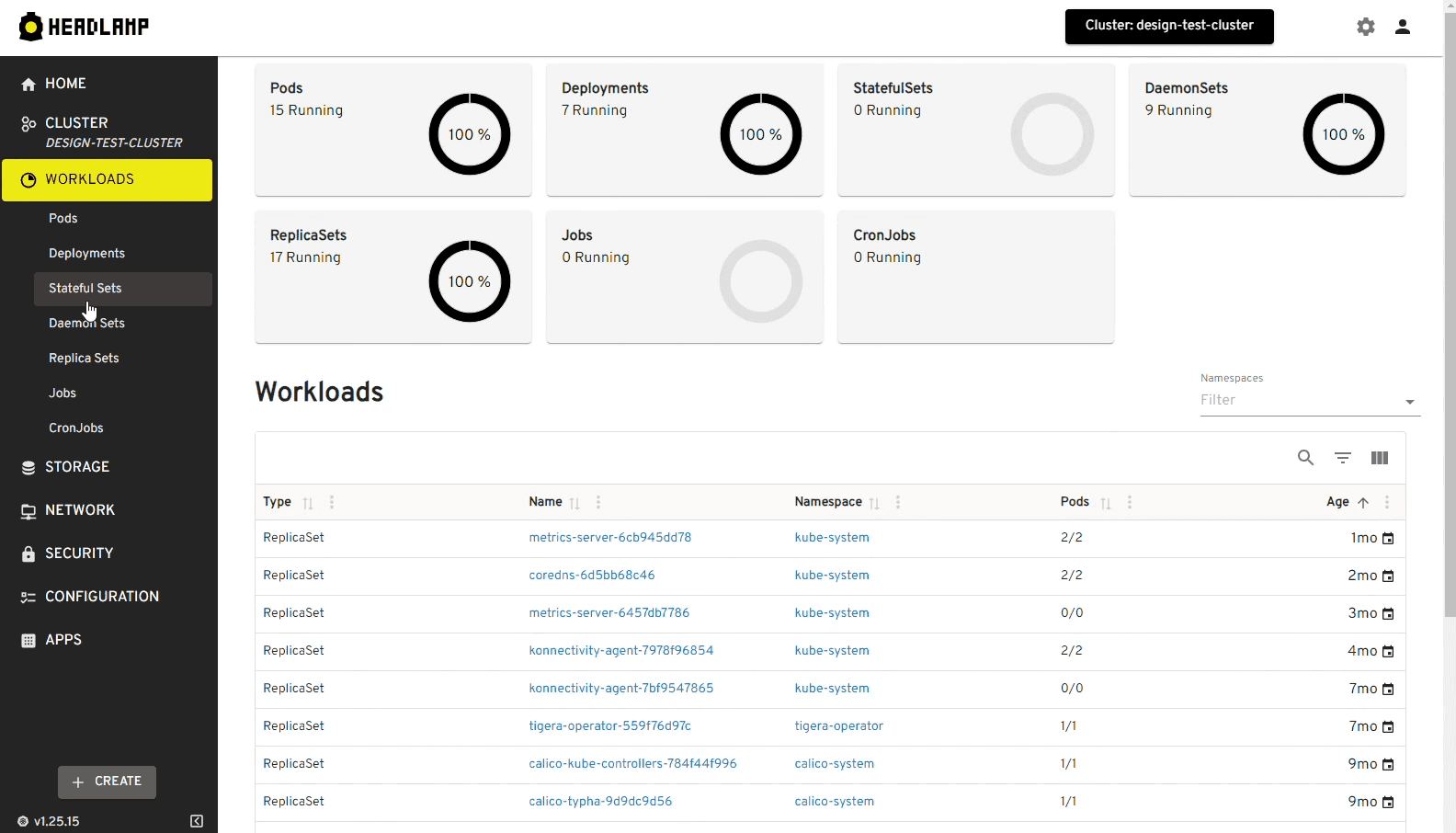
To visually manage and monitor your Kubernetes cluster, you can use a Dashboard. In the past kubernetes offered a web-based app called Kubernetes Dashboard, but lately it has been deprecated. As recommended alternative we will use Headlamp application.
Headlamp is a web-based user interface for Kubernetes that allows developers to manage and monitor their clusters visually. It provides an intuitive interface for viewing resources, managing deployments, and monitoring the health of applications running in the cluster.