Kubernetes for Developers - Services
In this post, we will explore Kubernetes Services and how they enable communication between different components in a cluster. You'll learn the four Service types — ClusterIP, NodePort, LoadBalancer and ExternalName — when to use each, and how to expose Pods with both kubectl port-forward and declarative YAML manifests.
Series — Kubernetes for Developers:
What is a Kubernetes Service?
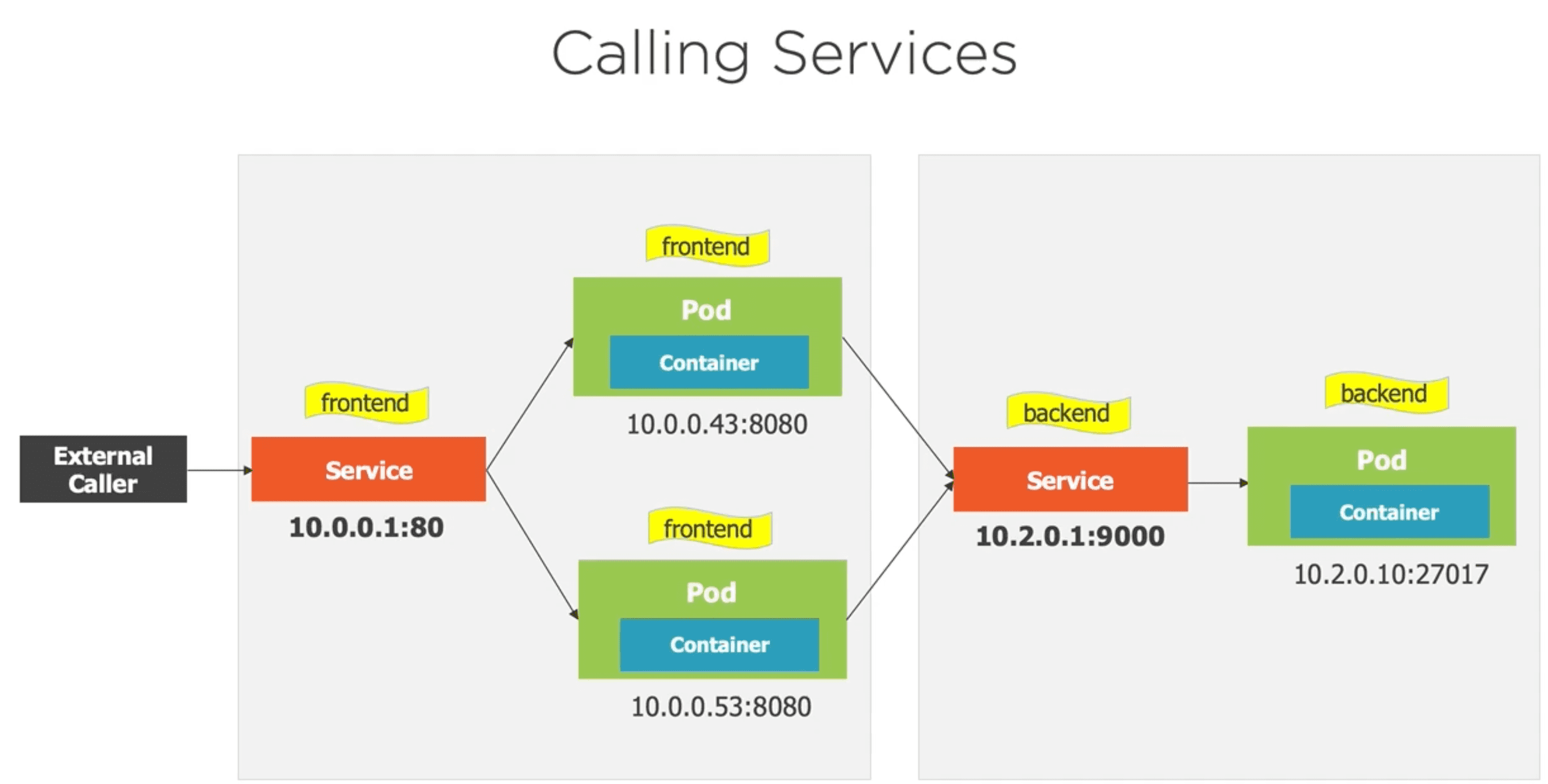
A Kubernetes Service is a single point of entry for accessing a set of Pods. It provides a stable IP address and DNS name, allowing clients to communicate with the Pods without needing to know their individual IP addresses. Services can also load balance traffic across multiple Pods, ensuring high availability and scalability.
When a Pod is created, it is assigned a unique IP address. However, Pods are ephemeral and can be terminated or replaced at any time. This means that their IP addresses can change, making it difficult for clients to communicate with them directly. Services solve this problem by providing a stable endpoint that clients can use to access the Pods.
Services rely on labels and selectors to determine which Pods they should route traffic to. By defining a Service, you can specify a set of labels that match the Pods you want to expose, and Kubernetes will automatically load balance traffic to those Pods.
Services are not ephemeral like Pods. They have a stable IP address and DNS name, which allows clients to communicate with them even if the underlying Pods change. This makes Services an essential component of Kubernetes networking.
Types of Kubernetes Services
Kubernetes provides several types of Services, each with its own use case:
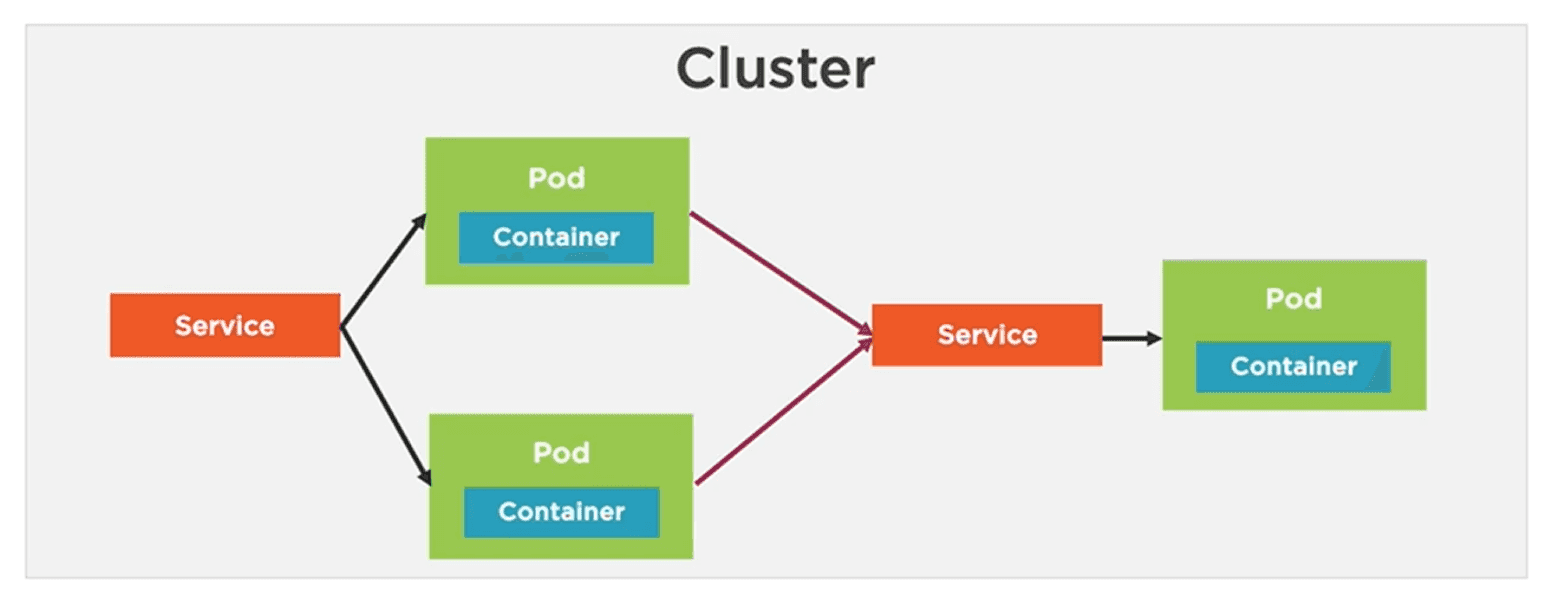
- ClusterIP: This is the default Service type. It exposes the Service on a cluster-internal IP address, making it accessible only within the cluster. This is useful for internal communication between Pods. Only the Pods within the cluster can access the Service using the assigned ClusterIP. The external world might need to access just a few services, but internally there might be many services that need to communicate with each other.
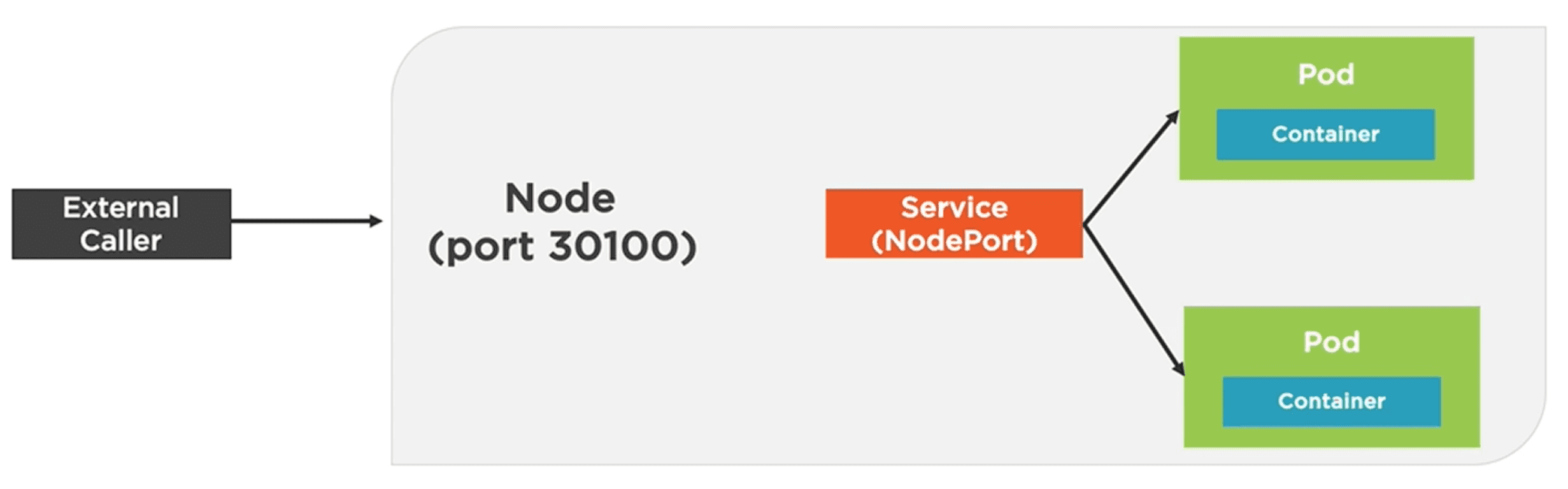
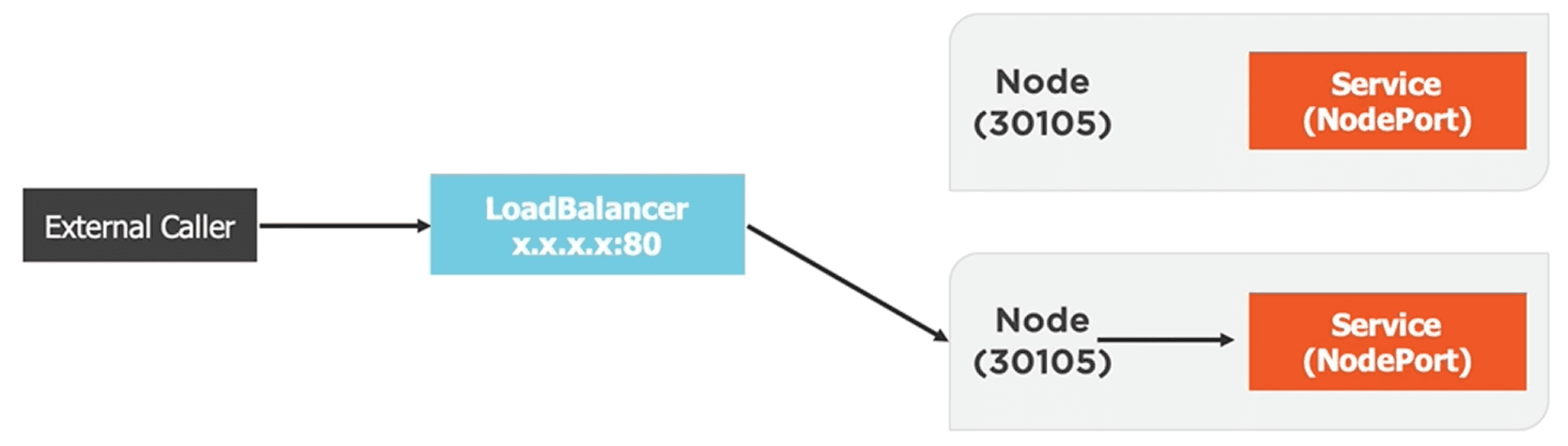
- NodePort: This Service type exposes the Service on a static port on each Node's IP address. It allows external traffic to access the Service by sending requests to any Node's IP address and the specified port. This is useful for exposing services to external clients. By default it assigns a port in the range 30000-32767, but you can specify a custom port if needed.
- LoadBalancer: This Service type provisions an external load balancer (if supported by the cloud provider) and assigns a public IP address to the Service. It allows external traffic to access the Service through the load balancer, which distributes traffic across the Nodes and Pods. This is useful for exposing services to the internet.
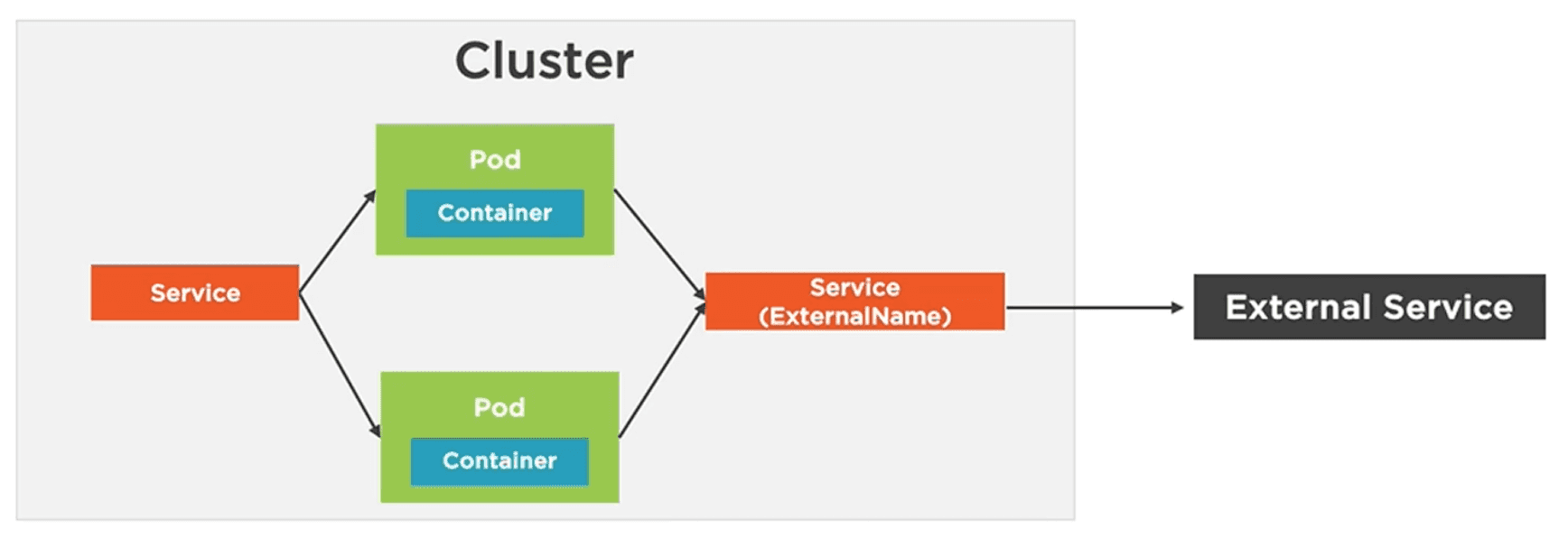
- ExternalName: This Service type maps the Service to an external DNS name. It is an alias for an external service. It allows you to access an external service using a Kubernetes Service, without needing to manage the external service directly. This is useful for integrating with external services.
How to Create a Kubernetes Service
How can we access a Pod from outside of Kubernetes? We cannot access it directly but we can use port forwarding to expose the ports from the Pod, the Deployment and finally the Service.
The imperative way: Port Forwarding
Imperatively we can do this with the following command:
# Listen on a local port 8080 and forward traffic to port 80 in the Pod
kubectl port-forward pod/<pod-name> 8080:80
# Listen on a local port 8080 and forward to Deployment's port
kubectl port-forward deployment/<deployment-name> 8080:80
# Listen on a local port 8080 and forward to Service's port
kubectl port-forward service/<service-name> 8080:80
Taking as example the following Deployment:
apiVersion: apps/v1
kind: Deployment
metadata:
  name: my-deployment
spec:
  replicas: 3
  selector:
    matchLabels:
      app: my-app
  template:
    metadata:
      labels:
        app: my-app
    spec:
      containers:
      - name: my-container
        image: my-image:latest
        ports:
        - containerPort: 80
This will create a Deployment with 3 replicas of the specified container, each listening on port 80.
To access this Deployment from outside the cluster, we can port forward to the Deployment's port using the following command:
kubectl port-forward deployment/my-deployment 8080:80And now we can access the application by navigating to http://localhost:8080 in our web browser.
Behind the scenes, Kubernetes creates cluster IPs for each Pod and load balances the traffic to the Pods. The Service acts as a stable endpoint for accessing the Pods, even if their IP addresses change.
The declarative way: Creating a Service YAML file
We can also create a Service declaratively by defining a YAML file. Here's an example of a ClusterIP Service that exposes the Deployment we created earlier:
apiVersion: v1
kind: Service
metadata:
  name: my-service # The name of the Service. Each service gets a unique DNS name. So we can access my-service:port from other Pods in the cluster, without needing to know the IP address of the Service.
spec:
  # Type could be ClusterIP, NodePort, LoadBalancer or ExternalName
  type: ClusterIP
  # Select the Pods template labels to route traffic to
  selector:
    app: my-app
  # Define the ports that the Service will expose
  ports:
  - protocol: TCP
    port: 8080 # The port that the Service will expose
    targetPort: 80 # The port on the Pods that the Service will route traffic to
We can also create a NodePort Service to expose the Deployment to external traffic:
apiVersion: v1
kind: Service
metadata:
  name: my-service
spec:
  type: NodePort
  selector:
    app: my-app
  ports:
  - protocol: TCP
    port: 8080
    targetPort: 80
    nodePort: 30080 # The port on each Node that will be used to access the Service from outside the cluster. If not specified, Kubernetes will automatically assign a port in the range 30000-32767.
Another example of a LoadBalancer Service that exposes the Deployment to external traffic:
apiVersion: v1
kind: Service
metadata:
  name: my-service
spec:
  type: LoadBalancer
  selector:
    app: my-app
  ports:
  - protocol: TCP
    port: 8080 # The port that the Service will expose externally.
    targetPort: 80 # The port on the Pods that the Service will route traffic to.
Finally, an example of an ExternalName Service that maps the Service to an external DNS name:
apiVersion: v1
kind: Service
metadata:
  name: my-external-service
spec:
  type: ExternalName
  externalName: external-service.example.com # The external DNS name that the Service will map to
  ports:
  - protocol: TCP
    port: 8080 # The port that the Service will expose externally.
Now that we have defined our Service, we can create it in the cluster using the following command:
# To create the Service from the YAML file. Throws an error if the Service already exists.
kubectl create -f my-service.yaml
# The apply command will create the Service if it doesn't exist or update it if it does.
kubectl apply -f my-service.yaml
By default, if the YAML file does not specify the service type, it will be created as a ClusterIP Service. If you want to create a NodePort or LoadBalancer Service, you need to specify the type in the YAML file.
Other related commands
Here are some other useful commands for working with Services in Kubernetes:
# List all Services in the cluster
kubectl get services
# Get detailed information about a specific Service
kubectl describe service <service-name>
# Delete a Service
kubectl delete service <service-name>
# Shell into a Pod and test a URL using curl
kubectl exec -it <pod-name> -- curl -s http://<service-name>:<port>