Kubernetes for Developers - Storage
In this post, we will explore Kubernetes Storage and how it enables persistent data management for applications running in a cluster. You'll learn the difference between Volumes, Persistent Volumes (PVs), Persistent Volume Claims (PVCs) and StorageClasses, and see ready-to-use YAML examples for emptyDir, hostPath, NFS and cloud-provider volumes like AWS EBS.
Series — Kubernetes for Developers:
What is Kubernetes Storage?
Kubernetes Storage provides a way to manage persistent data for applications running in a cluster. It allows you to define storage resources that can be used by Pods, ensuring that data is preserved even if the Pods are terminated or replaced. Kubernetes supports various types of storage, including local storage, network-attached storage (NAS), and cloud-based storage solutions.
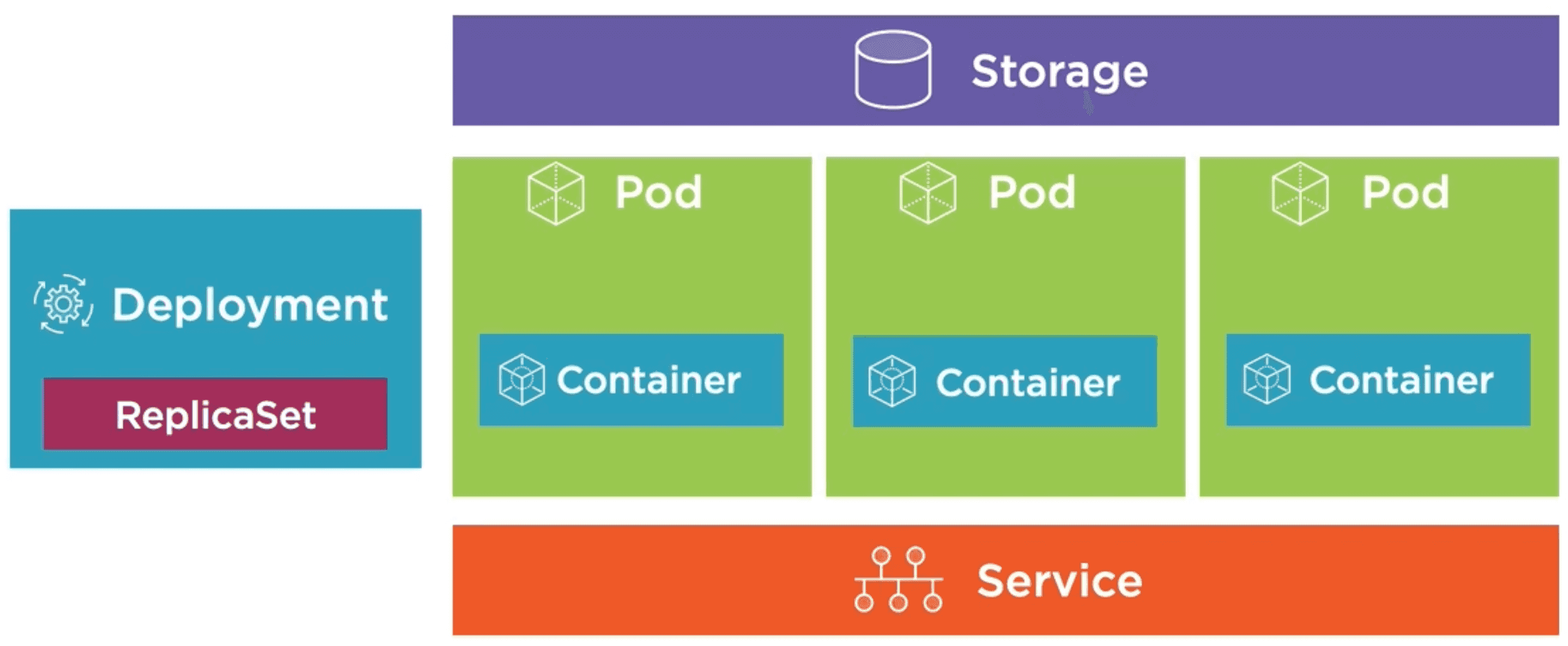
Kubernetes provides several abstractions for managing storage, including Volumes, Persistent Volumes (PVs), Persistent Volume Claims (PVCs), and Storage Classes. These abstractions allow you to decouple storage from the lifecycle of individual Pods, making it easier to manage and scale your applications.
Types of Kubernetes Storage
Kubernetes supports several types of storage, each with its own use case:
- Volumes: A Volume is a directory that is accessible to the containers in a Pod. Volumes can be used to share data between containers in the same Pod and can be backed by different storage types, such as emptyDir, hostPath, or network storage.
- Persistent Volumes (PVs): A Persistent Volume is a piece of storage in the cluster that has been provisioned by an administrator or dynamically provisioned using Storage Classes. PVs are independent of the lifecycle of Pods and can be reused by different Pods over time.
- Persistent Volume Claims (PVCs): A Persistent Volume Claim is a request for storage by a user. PVCs allow users to request specific storage resources without needing to know the details of the underlying storage infrastructure. When a PVC is created, Kubernetes will bind it to an available PV that meets the requested storage requirements.
- Storage Classes: A Storage Class provides a way to define different types of storage with specific characteristics, such as performance, availability, and cost. Storage Classes allow administrators to define policies for dynamic provisioning of PVs, enabling users to request storage without needing to know the details of the underlying storage infrastructure.
Volumes
Volumes are a fundamental concept in Kubernetes storage. They provide a way to share data between containers in the same Pod and can be backed by different storage types. Some common types of Volumes include:
- emptyDir: A temporary directory that is created when a Pod is assigned to a Node and exists as long as the Pod is running (shares Pod's lifetime). It is useful for sharing data between containers in the same Pod.
- hostPath: A directory on the Node's filesystem that is mounted into a Pod. It allows Pods to access files on the Node, but it is not suitable for production use due to potential security risks. It is easy to set up but it can potentially lead to data loss if the Node fails or is removed from the cluster.
- nfs: A network file system that allows Pods to access shared storage over the network. It is useful for sharing data between Pods running on different Nodes and can be used for persistent storage. It requires a separate NFS server to be set up and managed, which can add complexity to the deployment.
- configMap/secret: Special types of Volumes that allow you to store key-value pairs like configuration data or sensitive information (like passwords) into Pods. ConfigMaps and Secrets are useful for managing application configuration and sensitive data in a secure manner. They are stored outside of the Pod's filesystem and can be updated without needing to rebuild or redeploy the Pod.
- persistentVolumeClaim: A Volume that is backed by a Persistent Volume Claim (PVC). It allows Pods to request specific storage resources and ensures that the data persists beyond the lifecycle of individual Pods. PVCs provide a way to decouple storage from the lifecycle of Pods, making it easier to manage and scale applications.
- cloud provider-specific Volumes: Many cloud providers offer their own storage solutions that can be used as Volumes in Kubernetes. For example, AWS provides Elastic Block Store (EBS) volumes, Google Cloud offers Persistent Disks, and Azure provides Managed Disks. These cloud provider-specific Volumes allow you to leverage the storage capabilities of your cloud provider while still using Kubernetes abstractions for managing storage.
Defining an emptyDir Volume
To define an emptyDir Volume in a Pod, you can include the following configuration in your Pod manifest:
apiVersion: v1
kind: Pod
metadata:
  name: my-pod
spec:
  volumes:
  # Define an emptyDir Volume named "my-volume". It will exist as long as the Pod is running and will be deleted when the Pod is terminated.
  - name: my-volume
    emptyDir: {}
  containers:
  - name: my-container
    image: my-image
    volumeMounts:
    - name: my-volume # Mount the emptyDir Volume to the container at the specified path.
      mountPath: /usr/share/my-data
  - name: my-sidecar-container
    image: node:alpine
    volumeMounts:
    - name: my-volume # Mount the same emptyDir Volume to the sidecar container at a different path.
      mountPath: /shared-data
Defining a hostPath Volume
To define a hostPath Volume in a Pod, you can include the following configuration in your Pod manifest:
apiVersion: v1
kind: Pod
metadata:
  name: my-pod
spec:
  volumes:
  # Define a hostPath Volume named "my-volume". It will mount the specified path on the Worker Node's filesystem into the Pod.
  - name: my-volume
    hostPath:
      path: /var/run/docker.sock # Specify the path on the Node's filesystem to be mounted into the Pod.
      type: Socket # this can be Directory, File, Socket, CharDevice, BlockDevice, or DirectoryOrCreate
  containers:
  - name: my-container
    image: my-image
    volumeMounts:
    - name: my-volume # Mount the hostPath Volume to the container at the specified path.
      mountPath: /var/run/docker.sock
Defining a Cloud Provider-Specific Volume (for example: AWS EBS)
To define an AWS EBS Volume in a Pod, you can include the following configuration in your Pod manifest:
apiVersion: v1
kind: Pod
metadata:
  name: my-pod
spec:
  volumes:
  # Define an AWS EBS Volume named "my-volume". It will mount the specified EBS volume into the Pod.
  - name: my-volume
    awsElasticBlockStore:
      volumeID: <volume-id> # Specify the ID of the EBS volume to be mounted into the Pod.
      fsType: ext4 # Specify the filesystem type of the EBS volume (e.g., ext4, xfs, etc.).
  containers:
  - name: my-container
    image: my-image
    volumeMounts:
    - name: my-volume # Mount the AWS EBS Volume to the container at the specified path.
      mountPath: /mnt/data
Other common alternative cloud provider-specific Volumes include:
- Google Cloud Persistent Disk: Use
gcePersistentDiskto mount a Google Cloud Persistent Disk into a Pod. - Azure Managed Disk: Use
azureDiskto mount an Azure Managed Disk into a Pod. - Azure File Share: Use
azureFileto mount an Azure File Share into a Pod.
Checking the Volume Mounts in a Pod
To check the Volume mounts in a Pod, you can use the following commands:
kubectl describe pod <pod-name>
kubectl get pod <pod-name> -o yaml
Persistent Volumes (PVs) and Persistent Volume Claims (PVCs)
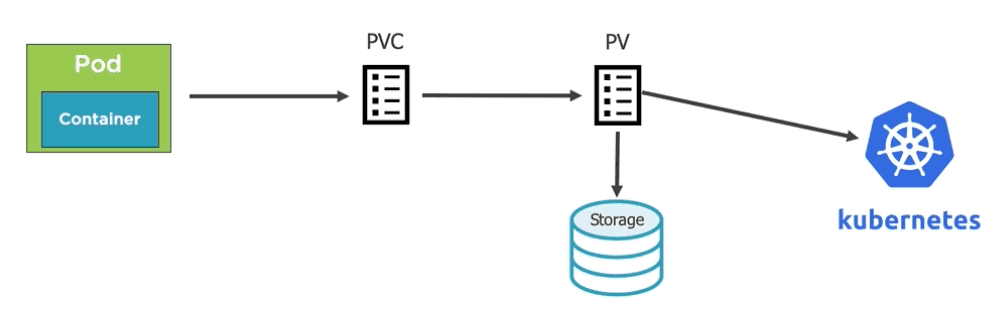
Persistent Volumes (PVs) and Persistent Volume Claims (PVCs) are key abstractions in Kubernetes storage that allow you to manage persistent data for applications running in a cluster.
PVs are storage resources that have been provisioned by an administrator or dynamically provisioned using Storage Classes. They have a completely independent lifecycle from the Pods that use them, allowing data to persist beyond the lifecycle of individual Pods.
PVCs are requests for storage by users, allowing them to request specific storage resources without needing to know the details of the underlying storage infrastructure.
So PV are set by the administrator and PVC are set by the user (application developer). When a PVC is created, Kubernetes will bind it to an available PV that meets the requested storage requirements.
The way it works is:
- An administrator have an storage resource (e.g. NFS, AWS EBS, GCP Persistent Disk, etc.).
- The administrator defines a Persistent Volume (PV) that represents that storage resource in the cluster, and send it to the Kubernetes API. That way it gets registered in the cluster and is available via the Kubernetes API.
- A user (application developer) creates a Persistent Volume Claim (PVC) that requests a specific amount of storage and specifies the desired access mode (e.g., ReadWriteOnce, ReadOnlyMany, ReadWriteMany). The PVC is sent to the Kubernetes API.
- Then go to the POD template, or any other resource template, and bind the PVC to a Volume in the Pod. The Pod will use that Volume to access the storage resource defined by the PV.
Defining a Persistent Volume (PV) and Persistent Volume Claim (PVC)
To define a Persistent Volume (PV) and Persistent Volume Claim (PVC), you can create the following YAML files:
Definition of a Persistent Volume (PV):
apiVersion: v1
kind: PersistentVolume
metadata:
  name: my-pv
spec:
  capacity:
    storage: 10Gi
  accessModes:
    - ReadWriteOnce
    - ReadOnlyMany
  persistentVolumeReclaimPolicy: Retain
  awsElasticBlockStore:
    volumeID: <volume-id>
    fsType: ext4
Definition of a Persistent Volume Claim (PVC):
apiVersion: v1
kind: PersistentVolumeClaim
metadata:
  name: my-pvc
  annotations:
    volume.beta.kubernetes.io/storage-class: "standard"
spec:
  accessModes:
    - ReadWriteOnce
  resources:
    requests:
      storage: 1Gi
Now we can bind the PVC to a Volume in a Pod by including the following configuration in the Pod manifest:
apiVersion: v1
kind: Pod
metadata:
  name: my-pod
  labels:
    app: storage-app
spec:
  volumes:
  - name: my-volume
    persistentVolumeClaim:
      claimName: my-pvc
  containers:
  - name: my-container
    image: my-image
    volumeMounts:
    - name: my-volume
      mountPath: /mnt/data
Storage Classes
Storage Classes provide a way to define different types of storage with specific characteristics, such as performance, availability, and cost. Storage Classes allow administrators to define policies for dynamic provisioning of Persistent Volumes (PVs), enabling users to request storage without needing to know the details of the underlying storage infrastructure.
Storage Classes define different types of storage, such as SSDs, HDDs, or network-attached storage (NAS), and can specify parameters such as replication, encryption, and backup policies. They act as templates for creating Persistent Volumes (PVs) for a specific type of storage.
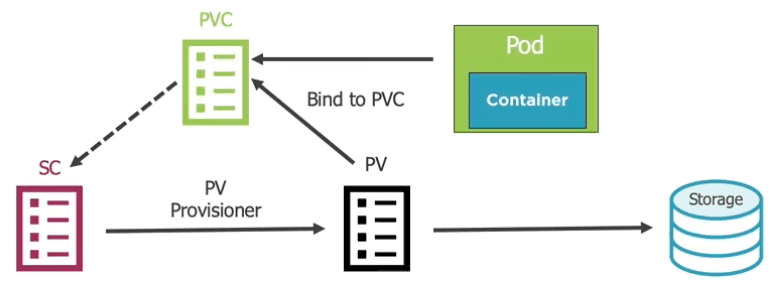
When a user creates a Persistent Volume Claim (PVC) and specifies a Storage Class, Kubernetes will dynamically provision a Persistent Volume (PV) that meets the requested storage requirements and is associated with the specified Storage Class.
This is the way it works:
- An administrator defines a Storage Class that specifies the desired characteristics of the storage, such as performance, availability, and cost. The Storage Class is sent to the Kubernetes API and gets registered in the cluster.
- A user (application developer) creates a Persistent Volume Claim (PVC) that requests a specific amount of storage and specifies the desired access mode (e.g., ReadWriteOnce, ReadOnlyMany, ReadWriteMany) and the Storage Class to be used. The PVC is sent to the Kubernetes API.
- Kubernetes dynamically provisions a Persistent Volume (PV) that meets the requested storage requirements and is associated with the specified Storage Class.
- The PV is then bound to the PVC, allowing the Pod to access the storage resource defined by the PV.
Defining a Storage Class
To define a Storage Class, you can create the following YAML files:
Definition of a Storage Class:
apiVersion: storage.k8s.io/v1
kind: StorageClass
metadata:
  name: my-storage-class
provisioner: kubernetes.io/aws-ebs # Specify the provisioner for the storage, in this case AWS EBS.
reclaimPolicy: Retain # Specify the reclaim policy for the storage (e.g., Retain, Delete, Recycle).
volumeBindingMode: WaitForFirstConsumer # Specify the volume binding mode (e.g., Immediate, WaitForFirstConsumer).
parameters:
  type: gp2 # Specify the type of storage (e.g., gp2 for AWS EBS, standard for GCP Persistent Disk, etc.)
  fsType: ext4 # Specify the filesystem type of the storage (e.g., ext4, xfs, etc.)
Now we can create a Persistent Volume Claim (PVC) that requests storage from the Storage Class by including the following configuration in the PVC manifest:
apiVersion: v1
kind: PersistentVolumeClaim
metadata:
  name: my-pvc
spec:
  accessModes:
    - ReadWriteOnce
  storageClassName: my-storage-class # Specify the Storage Class to be used for the PVC.
  resources:
    requests:
      storage: 1Gi
Lastly, we can bind the PVC to a Volume in a Pod by including the following configuration in the Pod manifest:
apiVersion: v1
kind: Pod
metadata:
  name: my-pod
  labels:
    app: storage-app
spec:
  volumes:
  - name: my-volume
    persistentVolumeClaim:
      claimName: my-pvc # Specify the name of the PVC to be used for the Volume.
  containers:
  - name: my-container
    image: my-image
    volumeMounts:
    - name: my-volume
      mountPath: /mnt/data